Full Swing Practice
Driving Range
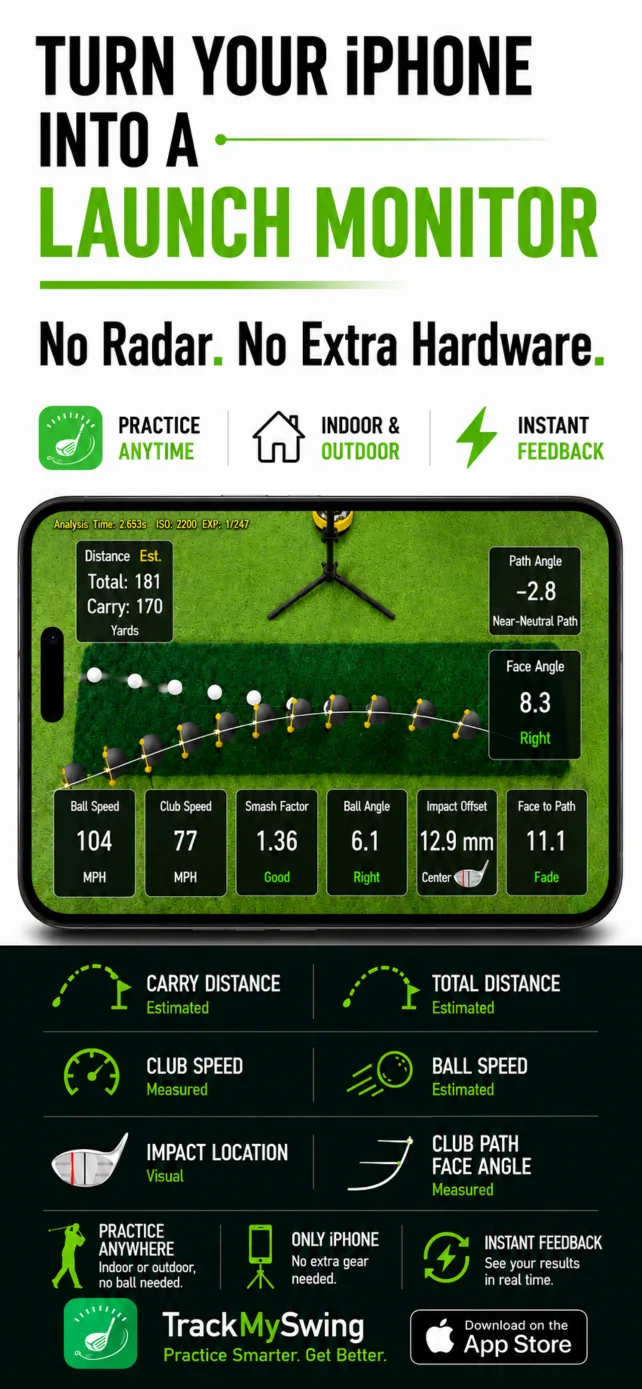
Practice full swings with shot data and a 3D view of ball flight. Review carry, total distance and direction, then inspect swing feedback. No-ball training is included here.
Explore shot feedback xShot
xShot

xShot Launch Monitor
Practice your swing. Play a round. Bring your friends.
Measure your shots, practice full swings, chips and putts, and enjoy golf games with friends—all powered by your iPhone camera.
Next update The 18-Hole Range Game is implemented and coming to the App Store in the next update.

Five Modes
Build your game with focused practice, then put your skills into play.
Full Swing Practice
Practice full swings with shot data and a 3D view of ball flight. Review carry, total distance and direction, then inspect swing feedback. No-ball training is included here.
Explore shot feedbackTarget & Free Practice
Work on chip distance and landing position. Use target practice or free practice to explore how shots land, bounce and roll on the green.
See practice feedbackTarget & Free Practice
Train putting pace and start direction. Practice toward a target or repeat putts freely while reviewing roll, proximity and finishing position.
See putting feedbackAround the Green
Turn short-game practice into a scored challenge. Play Chip & Putt or Putting Only with up to eight players taking turns on one iPhone.
Explore Short GameTee to Green · Next Update
Bring full swings, approach shots, chips and putts into a scored range-based golf game. Choose from four tee options and play with up to eight people.
Preview Range Game18-Hole Range Game · Coming Next Update
Give every shot a purpose. Play from tee to green in xShot’s range-based game, choose your tee, and enjoy a local round with friends.
Start each hole from the tee chosen for that player.
Use full swings and approaches, then chip around the green.
Put out, follow the live scorecard and continue the round.
Four tee choices
Each player can choose their own tee. Course yardage is adjustable in the app.
Availability: verified in the current app implementation on October 9, 2026; not yet listed in App Store version 2.5.6. Coming in the next update.
Games
Short Game is available now. The new 18-Hole Range Game expands play from tee to green in the next update.
Available now
Stay around the green with two scored formats:
Coming next update
Start from the tee and combine full swings, approaches, chips and putts in a scored range environment.
Shot Data & Swing Feedback
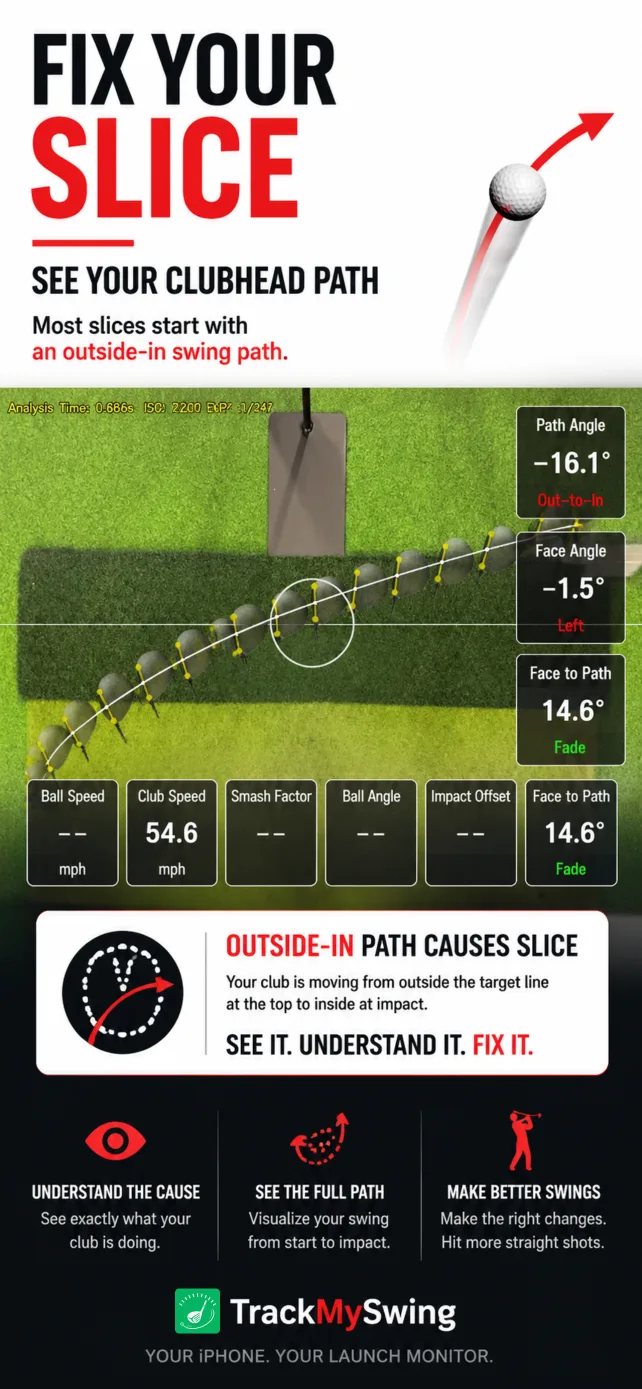
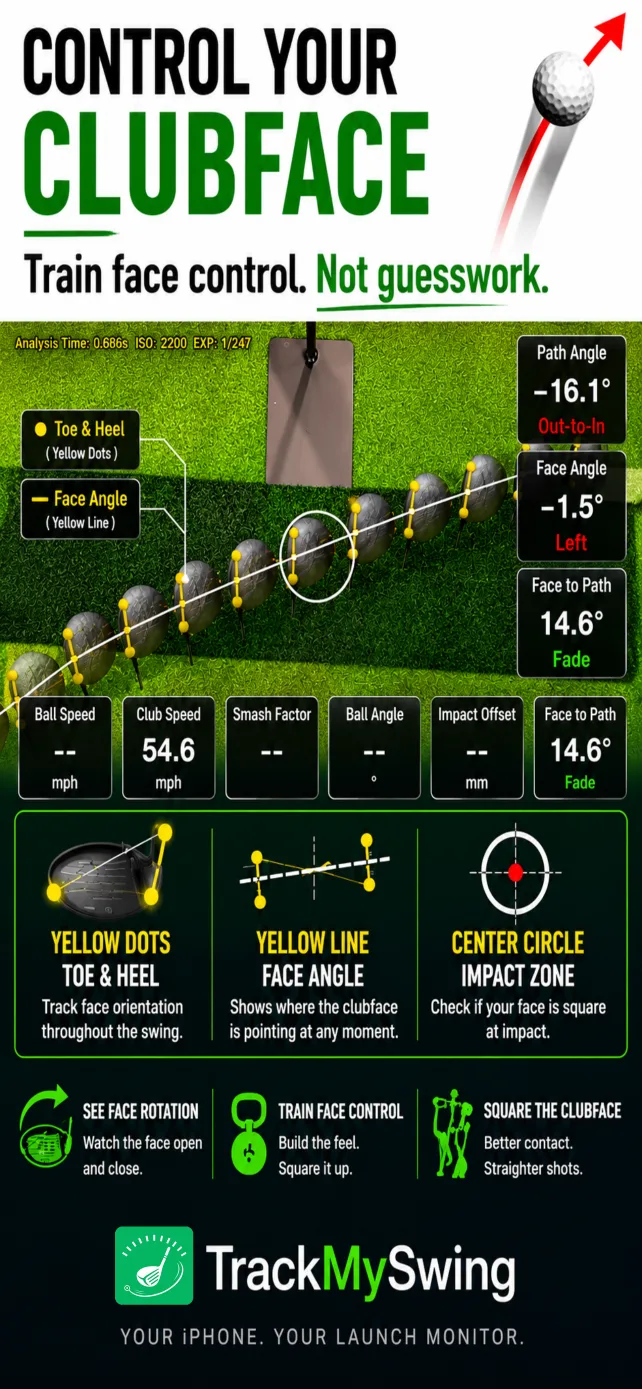
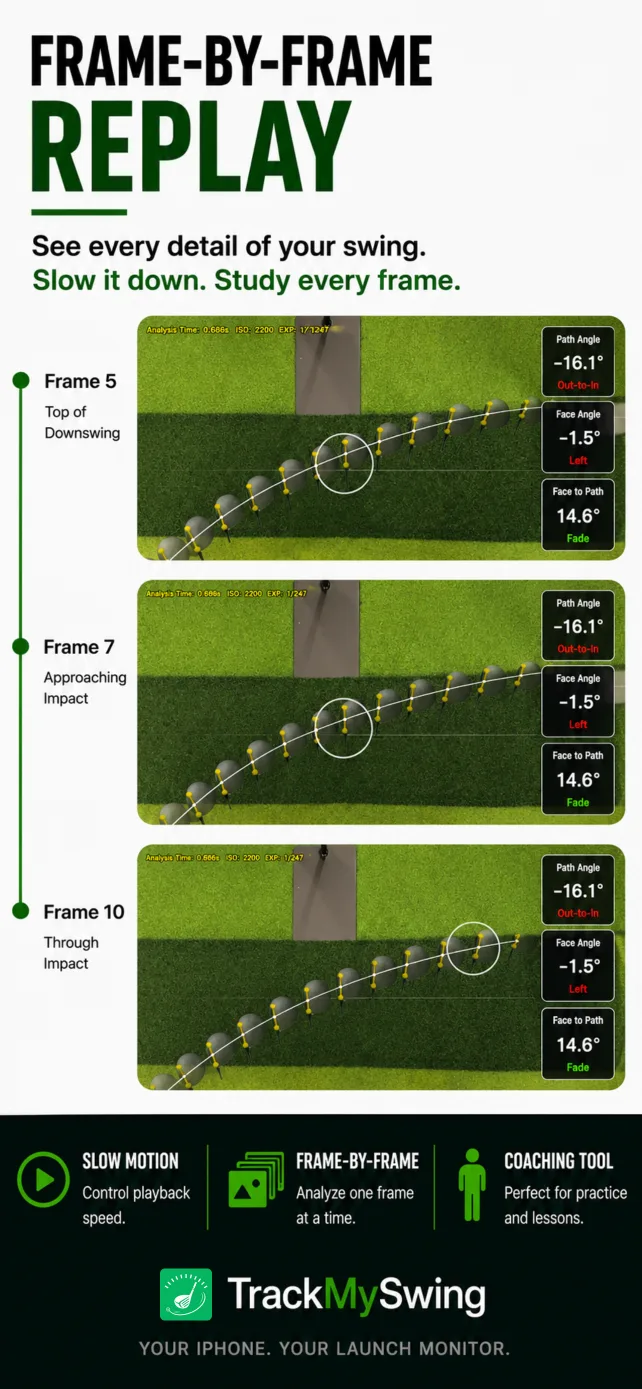
xShot connects video-measured shot inputs with clear 3D feedback, clubhead analysis and replay. The exact data shown varies by mode and captured shot.
Club Speed, Ball Speed, Launch Angle and Side Angle when supported by the captured shot.
Club Path, Face Angle, Face to Path and Impact Offset. Estimated values remain marked Est in the app.
Carry, Total, flight, landing, bounce and roll are calculated from captured inputs, club selection and settings.
Replay the impact moment in slow motion, practice without a ball, and review saved shots and summaries.

How It Works
Mount a compatible iPhone securely above the hitting area on a stable adjustable stand, then follow the in-app calibration and safety guide.
Select focused practice or a game. Use the ball, club and safe practice space required for that mode; no-ball training is part of Driving Range.
Take your shot and review the available measurements, 3D result, swing feedback and HitClip replay.
You still need a compatible iPhone capable of 1080p at 240 fps, a stable phone stand, adequate clearance and the appropriate ball, club, mat, net or open practice area for your selected mode. Keep the phone outside the swing and follow-through path.
Inside xShot
xShot in Action
Real demonstrations of the current App Store experience. Range Game footage will be added after a public gameplay video is available.
Driving Range
See full-swing practice, 3D ball flight and immediate feedback powered by one iPhone.
Watch on YouTubeMeasurement
Watch the top-down capture setup and the club- and ball-speed measurements behind an analyzed swing.
Watch on YouTubeNo-Ball Training
Measure Club Speed and review swing-path feedback in Driving Range without presenting a generated flight as a measured real shot.
Watch on YouTubePricing
xShot is free to download. Free users receive up to 20 analyses per day; Pro unlocks unlimited practice.
Free
Up to 20 analyses per day. Download and try xShot with a compatible iPhone.
Download freeAnnual Pro · Best value
Unlimited practice. Renews annually unless canceled. Price may vary by region.
View in the App StoreMonthly Pro
Unlimited practice. Renews monthly unless canceled. Price may vary by region.
View in the App StoreFAQ
Practice full swings in Driving Range, chips in Chipping Range and putts in Putting Range. Play Short Game now, and play the new 18-Hole Range Game after the next update.
A scored golf game in xShot’s range environment. It combines full swings, approaches, chips and putts from tee to green. Choose a 1, 3, 9 or 18-hole round.
Gold, Blue, White and Red. Each player can choose their own tee, and the course yardage for each tee is adjustable.
Short Game and Range Game support 1–8 local players taking turns on one iPhone. Range Game is coming in the next update.
Short Game stays around the green with Chip & Putt or Putting Only formats. Range Game starts from the tee and moves through the complete tee-to-green sequence.
No. It uses xShot’s range environment with generated Par 3, 4 and 5 holes. It is not a real-course library or online multiplayer service.
Yes. Driving Range includes no-ball training with measured Club Speed and swing-path feedback. Any displayed training flight is generated from Club Speed and club selection, not measured ball flight.
A compatible iPhone capable of recording 1080p at 240 fps, a stable adjustable stand, safe clearance and the ball, club and practice setup appropriate for the mode.
Calculated. For a successfully captured shot, xShot measures inputs such as Ball Speed and Launch Angle from video, then calculates Carry, Total and the simulated flight.
Driving Range, Chipping Range, Putting Range and Short Game are available in version 2.5.6. The implemented 18-Hole Range Game is coming in the next update.
Ready to Practice?
Download xShot for focused practice now, then bring your friends to the 18-Hole Range Game in the next update.